¶ Viewing received certificates
The received certificates page collates all your certificates received either personally or on behalf of an organisation you are representing (see navigation).
The page provides a number of viewing options as well as filters.
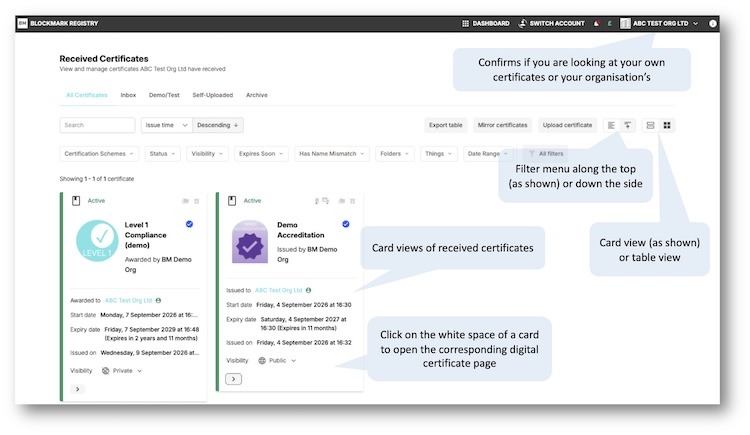
The default view is for the certificates to be shown as cards with a filter menu along the top. This is good if you have just a few certificates and is the likely view you'll see when you first view this page.
However, you can also list the certificates in a table. And place the filter menu down the lefthand side. The system remembers these preferences for you on this page on subsequent visits.
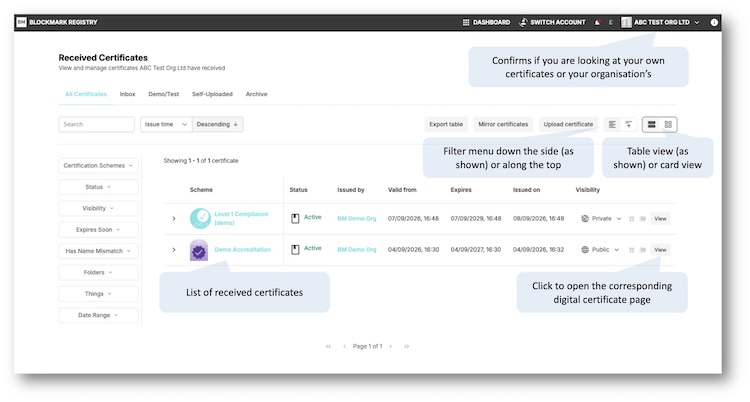
Both of these views summarise each certificate with additional information available by clicking the '>' in each view.
To view a particular digital certificate in full, either click on the white space of a card or the 'View' button on the table.