¶ Digital certificates
Each digital certificate has its own web-page which displays information about the certificate and provides a menu of actions and options.
Whether you can view a particular certificate depends on its settings and your relationship to it (i.e. if you are logged in as the issuer, logged in as the recipient, not logged in or a third party). The associated menu is also dependent on this relationship.
'Certificate' is the default name for the credential, but the scheme may owner may have given it another name like a letter, badge or license. Where this is the case, the noun is replaced for clairty.
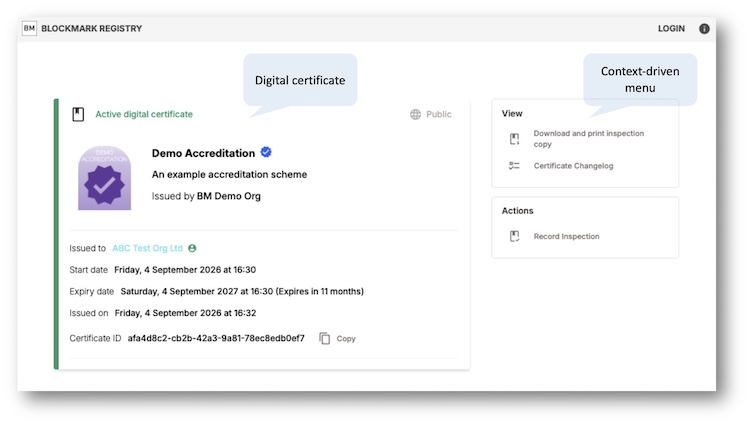
The digital certificate page has the following anatomy:
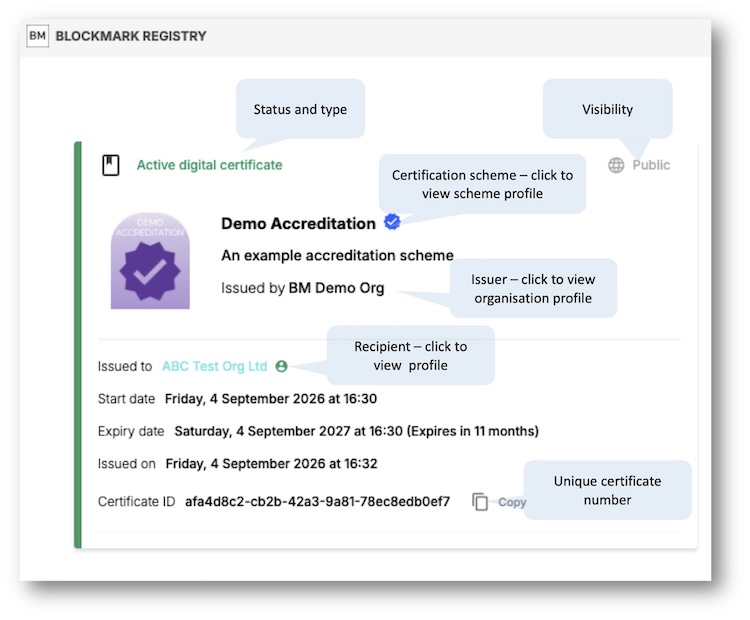
This page allows you to find out more about the certification scheme that the certificate relates to, the issuer, the recipient and to see easily whether the certificate is still valid. It also shows the certification mark (scheme logo).
The certificate may also show some additional custom information based on the certification scheme's custom fields. Some of this additional information may be public or private. Private information is only viewable by you, the issuer and us and is indicated by a privacy icon. Note the certification scheme owner can change the public/private settings of these custom fields, so information shown as private could become public in the future.
The certificate may also show some additional custom notes. This information is only viewable by the issuer and us and is indicated by a privacy icon.
¶ Other assets
Digital certificates may also have other assets associated with them, some defined by the certification scheme settings set by the issuer.
- Certificate changelog
- Blockchain log (for blockchain enabled certificates)
- PDF certificate (original and inspection copy)
- Branding guidelines (or other documentation)
- Certification mark image file
- Smart badge (web and email versions)
- Digital certificate variant for smart phone wallets (Apple and Google)
- CPD evidence (for certificates that are CPD enabled)
¶ Side menu
The side menu shows different options depending on your relationship with the certificate.
View
- Download and print certificate (if applicable to the scheme, only for issuer and recipient)
- Download and print inspection copy (if applicable to the scheme, available to all if the certificate is public)
- Download / print certification mark (if applicable to the scheme, only for recipient)
- Certificate changelog (available to all if the certificate is public)
- Certification timeline (shows the successive public certificates within the scheme, so you can see how long the receipient has been certified and any gaps between renewals).
- Inspections (if you are the issuer you can see when this certificate was inspected by you or members of your staff, and when this certificate was inspected by others but not by whom. If you are the recipient, you can see when this certificate was inspected by others and by whom. If your are a logged in user you can see when you have inspected this certificate previously).
Share
- Share with a shareable link, with optional time-limitation, and allows private certifcates to be viewed. (only for recipient)
- QR code, pointing to the digital certificate page without a share key, so only works if the certificate is set to public. (only for recipient)
- Smart badge for website* (only for recipient)
- Smart badge for email* (only for recipient)
- Add to LinkedIn (if a personal certificate and you are the recipient)
- Post to: LinkedIn, Facebook, X (Twitter), Bluesky, Threads. This feature opens a window showing your social media account (when you are logged in) and prepares a post. For a personal certificate, the draft post begins 'I've been awarded...' and for an organisation certificate, the draft post begins 'We've been awarded...'. You may, of course, edit the text. Ensure that you are posting to your / your organisation's social media account as appropriate. The post will show an image of the certificate scheme mark and a link to your certficate (this is derived from the link the draft post includes and is designed to circumvent the ReCapture robot checker, so best not to edit that!). If the certification scheme does not allow the logo/mark to be downloaded, the version with the 'sample' watermark will be used (only for recipient, certificate must be public).
Actions
- Issue a superceding certificate (only for issuer)
- Upgrade or downgrade a certificate (only for issuer)
- Public / private switch (only for recipient)
- Archive / unarchive switch (only for recipient)
- Record inspection (not for the recipient)
- Edit (only for issuer)
Wallets
- Add to Apple Wallet (only for recipient)
- Add to Google Wallet (only for recipient)
*Find out more about smart badges.