¶ Receiving an organisation's certificate
You will be sent an email providing details about the new certificate and a link to manage it on the platform. If you are new to the platform, you can onboard using the email you received.
If the organisation, based on the organisation identifier, already exists on the platform, the certificate will be automatically added to the organisation's received certificates area. When you (or a colleague with appropriate permissions) next refresh the page or log in, the certificate will be there to manage, regardless as to whether you or a colleague clicks the link in the email sent.
To reach an organisation's certificate, you need to make sure you are in your organisation account. Do this from the screen below:
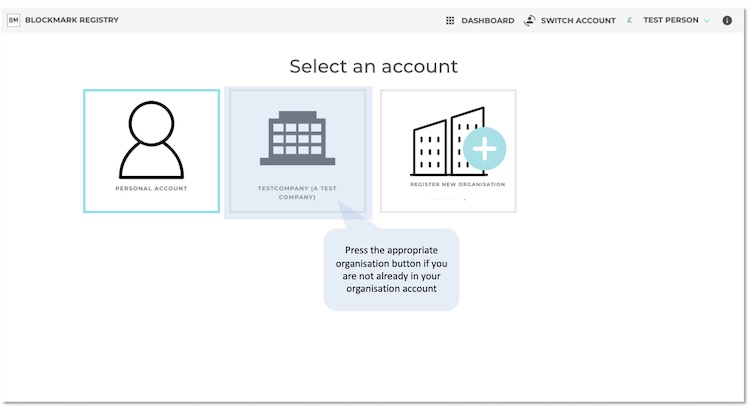
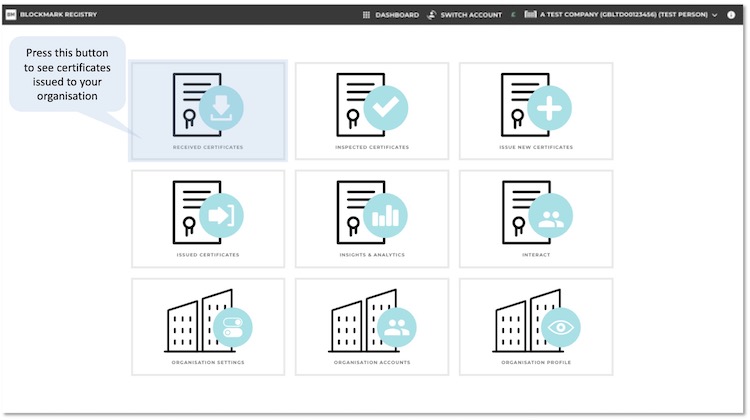
And then, on the organisation dashboard, go to Received Certificates page:
A certificate for your organisation may be issued as private or public by default, as determined by the certification scheme owner. The associated organisation profile is also created if one does not already exist.
- Viewing your certificate