¶ Receiving a personal certificate
A personal certificate is one that is issued to an individual and will be in your name (or possibly the name of someone you are a guardian for).
You will be sent an email providing details about the new certificate and a link to manage it on the platform. If you are new to the platform, you can onboard using the email you received.
If you are sent a personal certificate to an email address already associated with you on the platform (this can be any of your validated emails in your settings; personal email addresses or work email addresses), the certificate will be automatically added to your personal received certificates area. When you next refresh the page or log in, the certificate will be there to manage, regardless as to whether you click the link in the email sent to you.
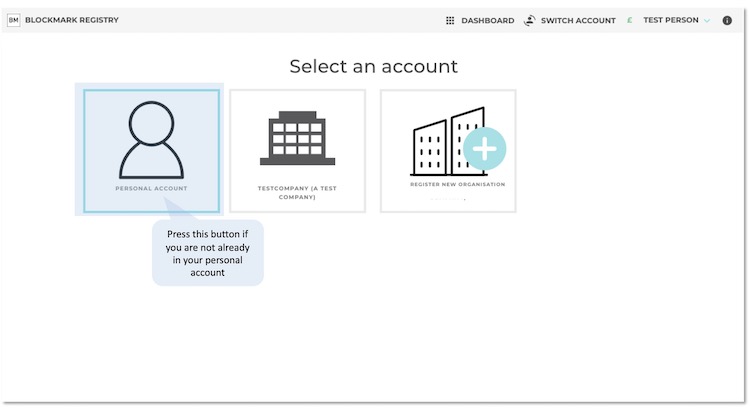
To reach a personal certificate, you need to make sure you are in your personal account. Do this from the screen below:
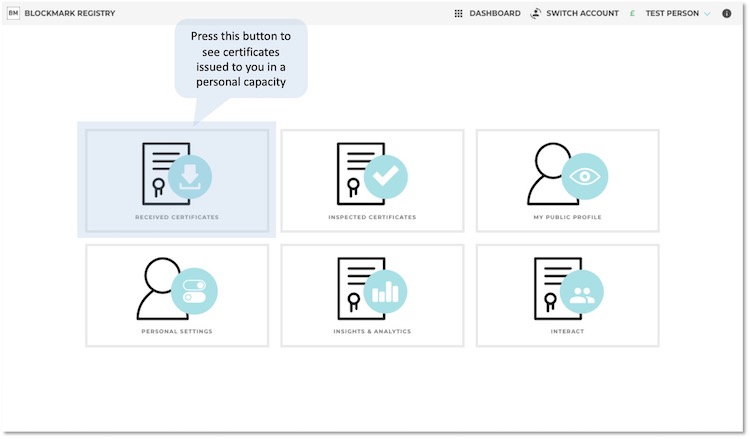
And then, on the personal dashboard, go to Received Certificates page:
Your personal certificate is issued as private by default. If you do not yet have a user account, the certificate remains hidden from public view, but can be viewed by the issuer or using a share code that you provide (for example via the QR code that may be included on a pdf version of the certificate)
- Viewing your certificate